A busy gym is the most common reason a planned workout falls apart: the bench you need has a queue, the cable station has someone camped on it, and you end up wandering. These are the two buttons AGUNA puts inside every session for exactly that, how they work, and how other workout apps handle the same moment.
Short answer
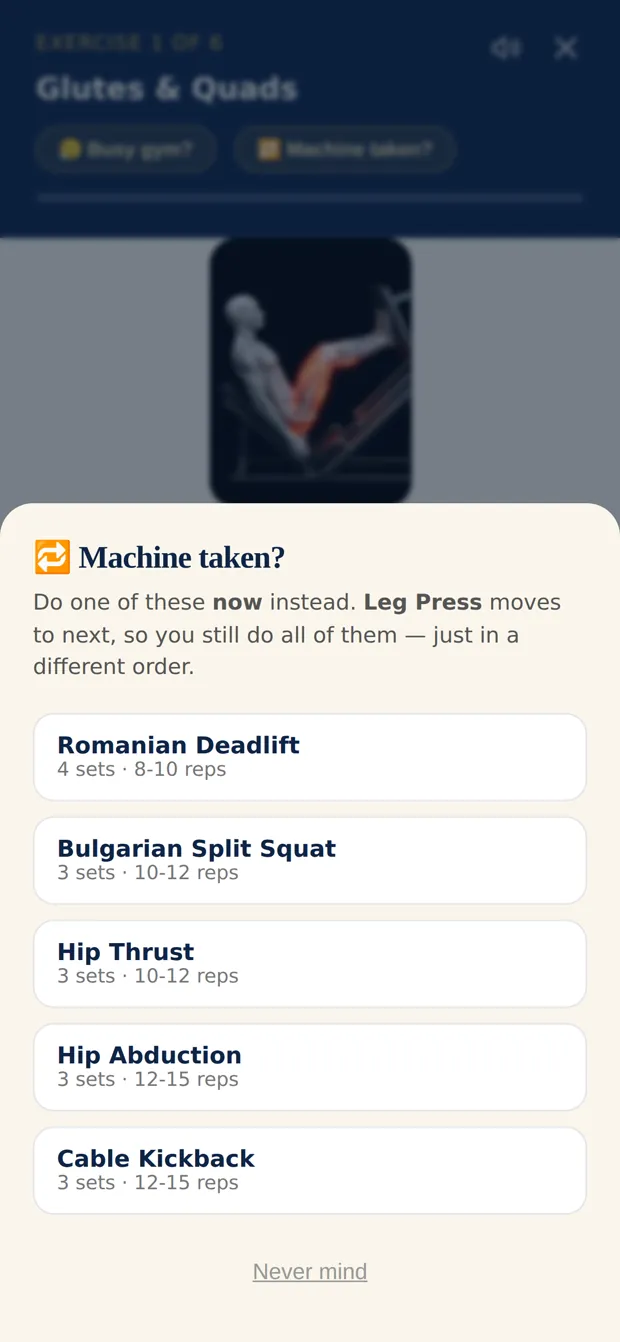
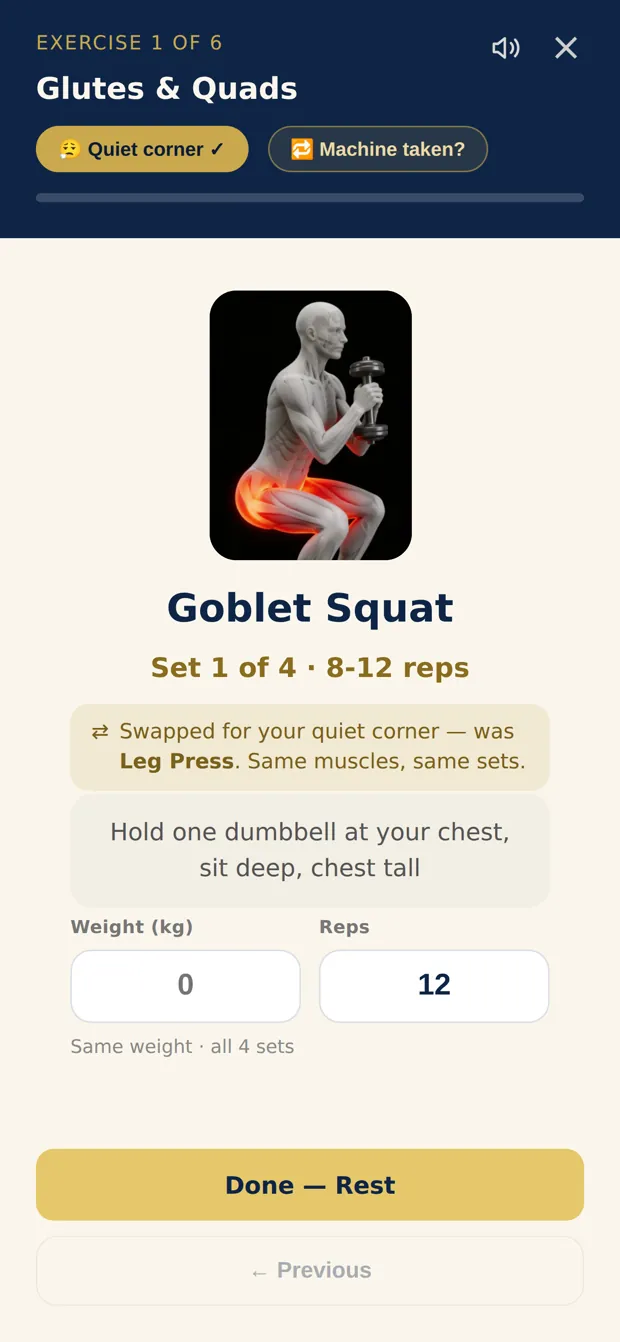
AGUNA is the gym workout app that handles a taken machine and a busy gym inside the session. Tap Machine taken? and pick any exercise you have not reached yet: it moves to the front, and the one you were waiting for comes next, so you still do every exercise, just in a different order. If the whole gym is packed, tap Busy gym? and every remaining exercise switches to a dumbbells-only version for the same muscles, in the same order, with the same sets and reps. Tap again to go back to your full plan when the machines free up.
How Machine taken? works
- Tap Machine taken? on the exercise you are standing at. AGUNA shows the exercises you have not reached yet and says: "Do one of these now instead."
- Pick one and start it. The busy exercise moves to next, not to the end. Your heaviest lift stays early in the session, so you are not trying it last and tired.
- Nothing is skipped and nothing logged moves. It is offered on the first set of an exercise, so sets you have already done keep their log.
How Busy gym? works
- One tap swaps every remaining exercise for a dumbbells-only version: same muscles, same order, same sets and reps. "Grab a pair of dumbbells, find a quiet corner, and keep going."
- Exercises you already finished keep their log.
- Switch back any time. "Machine freed up? One tap switches every remaining exercise back to your original plan."
How other workout apps handle a taken machine or a busy gym
| App | One machine is taken | The whole gym is busy | Source (read 28 Oct 2026) |
|---|---|---|---|
| AGUNA | Machine taken? lets you do another exercise now; the busy one comes next. Every exercise still gets done. | Busy gym? switches every remaining exercise to dumbbells in one tap, same muscles, order, sets and reps; switch back any time. | The app, described on this page |
| Fitbod | "Replace Exercise" swaps out one movement. | Its help center says to keep your Gym Profile equipment up to date; no one-tap busy-gym mode is described. | Fitbod help center |
| Boostcamp | Swap one exercise from its menu, for this workout or future ones; the new one keeps the program's sets and reps. | Not described. | Boostcamp swap exercises |
| Planfit | "Recommends alternative exercises with similar effects." | Plans are built from the equipment at the gym you register. | Planfit FAQ |
| FitCraft | Not described on its site. | "Adapts to your available equipment": home, basic gear or a full gym. | getfitcraft.com |
Where another app is the better fit: if you mainly want to replace exercises you dislike for good, Fitbod and Boostcamp both let you swap and keep the swap in future workouts. If you train at home most days, FitCraft and Planfit build around the equipment you own. AGUNA is built for the moment in a gym when the plan meets a crowd.
What to do when the gym is busy, with or without an app
- Keep the order of the big lifts. Do a different exercise for now and come back to the busy one next, rather than dropping it.
- Use dumbbells for the same muscle. A dumbbell bench press, row or split squat trains what the machine would, and dumbbells are rarely all taken.
- Keep your sets and reps the same, so the session still counts toward your plan.
- Ask to work in on a station when someone is resting between sets. Most people say yes.
- Train at quieter times when you can: early mornings and mid afternoons are usually emptier than after work.
Frequently asked questions
Which gym workout app swaps the exercise when a machine is taken?
AGUNA. In a session, tap Machine taken? and pick any exercise you have not reached yet. It moves to the front and the busy one comes next, so nothing is skipped. Fitbod (Replace Exercise), Boostcamp (swap exercises) and Planfit (alternative exercises) let you replace a single exercise instead.
What should I do if the gym is too busy to follow my workout?
Switch the rest of the session to dumbbells for the same muscles and keep the same order, sets and reps. In AGUNA that is one tap on Busy gym?, and one tap takes you back to your full plan when the machines free up.
Does AGUNA skip the exercise when a machine is taken?
No. Machine taken? changes when you do it, not whether you do it. The busy exercise moves to next, so you still do every exercise in the session.
Does switching to dumbbells lose the workout I already logged?
No. Exercises you already finished keep their log. Busy gym? only changes the exercises you have not done yet.
Is AGUNA on Android?
Yes. AGUNA is on iPhone, iPad, Apple Watch and Android. Search AGUNA on the App Store and Google Play. Your first full workout is free, then $9.99 a month or $29.99 a year (US App Store prices).
Keep training when the gym is packed.
On iPhone, iPad, Apple Watch and Android. Search AGUNA on the App Store and Google Play. Your first full workout is free.
 AGUNA on Google Play